Thursday, October 31, 2013

Thing #2: Getting Connected is the best PD!


You will expand your PLN using Twitter!

Rough news:  There are mini-assignments due on a weekly basis for this month.   This is necessary as the rest of the 10ThingsTechie Team needs you.  And for you to see the benefits!
Good news: The mini-assignments look more time-consuming than they are.  Thing #3 will be easy and fun, so hang in there!!

Why?

We are going to get you connected to mentors by using Twitter. 
No doubt you have heard Twitter is being used in education.  Many educators use it to communicate to their students and parents.  Many more are using to it reach out to colleagues virtually.
If you aren't using Twitter as a professional development feed, I'm guessing that:
  • you don't have time/haven't had a chance
  • you aren't a fan of Social Media
  • you don't know how/where to start


@MsVictoriaOlson says it all in a 4:37 minute video I'm asking you all to watch.

Basically, I can help you with the tech but I can't help you with your subject areas.  By expanding your PLN, you can 'meet' others who teach your subject, integrate tech, or hopefully both.

How?

Rather than making my own tutorials, I'm sending you the masters (yes, I found this on Twitter Monday morning). Go to this page: The Twitteraholic’s Ultimate Guide to Tweets, Hashtags, and All Things Twitter  You can also ask a student or offspring for help!


I already have Twitter

If you have it, that is awesome.  You need one for professional use-- separate from your personal account! While some of you have class accounts, I'm not aware of any of you using Twitter professionally but I could be wrong. If you are tweeting out to your class, I highly recommend that it is different.
Here are mine (FYI--It is wicked easy to switch between accounts if you have an iPhone, iPod, iPad or other smartphone device.  Just click from one to the other.)
@SaraKLMS is my professional account.  I learn from Librarians and Techie Educators.
@SHSLMCtweets is from the library.  I share hours, clubs, bookish links.
@saraksarak is my personal account (I don't use it unless I'm checking on my kid.)

You can only have one email for each account.  I used Gaggle for one, Stratford for another, and personal for the personal.

Okay, now what's the assignment?

Rookies Don't freak!  It is easier than it looks.  It isn't enough to create an account and tweet once or twice.  The value comes from using it. 
 
Due Saturday, November 9
a.  Create a professional account.  Don't be afraid to be 'transparent' meaning visible to the public.  There's nothing wrong with being seen as a lifelong learner.  Use your 'brand' (recommended in Thing #1).
b.  Post 1 tweet out to our hashtag (conversation) so we know you are in! #10thingstechie  You can type it in and see my tweets already. 
c.  Follow me: @SaraKLMS.
 
Due Saturday, November 16
a.  Follow your teammates! Their Twitter names/handles (@******) will be in the #10thingstechie hashtag (which is why you can't put this off to the last minute!). 
b.  Follow educators in your field or techie people.  Follow the people who your followers follow.  Follow people who are active (not just tweeted 3 times in the last year).  Enjoy getting followers.  Block any weirdos (you'll get a couple).
c.  Be a Lurker! . You watched the video above, right?  Read posts of things you like. Lurk about 3 times a week at least.   I can't stress enough how important it is to check in often, even if for 2 minutes.  I check on line at the supermarket, waiting for my kid to get out of rehearsal...  Twitter is not blocked at school, so "favorite" it and glance at it during a prep period or after school.
When you see a good post you don't want to forget, "favorite it".  I'll show you how to access, organize, and share those in Thing #4!
 
Due Saturday, November 23
a. Be a Participant...or maybe an Author.  Jump in!  Share good links!  Encourage each other! Retweet posts.  Don't forget to add the #10thingstechie hashtag.  Your momentum will motivate others.  Again, do this more than once.
b. Share 1 #eduwin  When something awesome happens in your class, tweet it out and add the hashtag #eduwin
 
Due Wednesday, November 27 (before you enjoy the holiday)
a. Participate in 1 educator chat.  #15 on The Twitteraholic’s Ultimate Guide . This is the best!  I'm only asking for one (but I hope you'll get addicted!).  See this link to find a time/date that suits your needs: Weekly Twitter Educator Chat Schedule  Plan ahead.
For more more info: 101+ Twitter Chat Groups for Educators: Topical List
d. Post a quick blog about getting started on Twitter.  Hopefully you are seeing the potential by now.

Varsity  Quality and Quantity! Tweet regularly.  Share. Keep that #10thingstechie conversation full. Gather more followers and followees.  Check out/share articles about using Twitter.  Help support newbies. Write additional posts on your blog.  Don't forget to comment on each others' blogs.
All-State Are you already an active user of Twitter for Professional Development?   Add a Feed in your Blog showing your tweets.  We'd like you to continue tweeting with us, but you can also explore Google+, Facebook, LinkedIn, EduBlog, Edmodo... You can also sit with a teammate who is just getting started.

Appendix on Twitter Chats

I browsed lists and have some suggestions for you to start!
Darron,  #SciChat, #flipclass
Geralyn #SciChat
Christina #Busedu (1st and 3rd Tuesdays only)
Alyce #collegechat, #collegebound #scholarships
Nancy #spedchat
Mark #musedchat, #edmusic
Marianne #hsmath, #mathchat
Kerith #psychat #sschat
Amy follow #StephenJenkin and @Latinlanguage
Olivia #langchat also check out #spanishteachers
Liz #engchat, #ell, #esl and follow Larry Ferlazzo (@larryferlazzo
Sarah #artsed
Going for 092? #edleadchat, Follow Eric Sheniger (@NMHS_principal)
Everyone and anyone: #smartee (Smart Board), #byotchat, #ccsschat, #edtechchat,

Wednesday, October 2, 2013

Thing #1: Blog to document, share, learn

Your first THING will be a blog.

Confused? Click to check out the welcome page.

Why?

Goal oriented? Documenting on the blog each month puts you in the running for a grand prize.
Process oriented? The blog gives you a chance to reflect, share, support, and gain ideas from other teammates.

Do I need to use Blogger?

I am using Blogger simply because I already have an account; if you have a Google account, you can use the same one, as they are integrated.  It will be easy for you to view and connect with other teammates who also use it.  My other recommendation would be Wordpress since it also has an app; if you have a smartphone, iPod, or iPad, blogging from your device will make the process easier. Gaggle has a blog feature (not too many bells or whistles).

But first...brand yourself!

Not the most exciting, but my professional persona is SaraKLMS. This is different from what I use with the students, and definitely separate from personal use. We will use it for Twitter, so take some time and come up with something clever and/or simple. 
Buffy Hamilton is the Unquiet Librarian; Todd Nesloney is @TechNinjaTodd.  You might want to check if it's a Twitter handle already or Google your idea, etc. Here's a wild and wacky article on the branding process: http://www.thedaringlibrarian.com/2010/04/creating-daring-librarian-brand.html
May I suggest you not embed your school name? What if you move?!

How?

Create an account in your blog site of your choice.
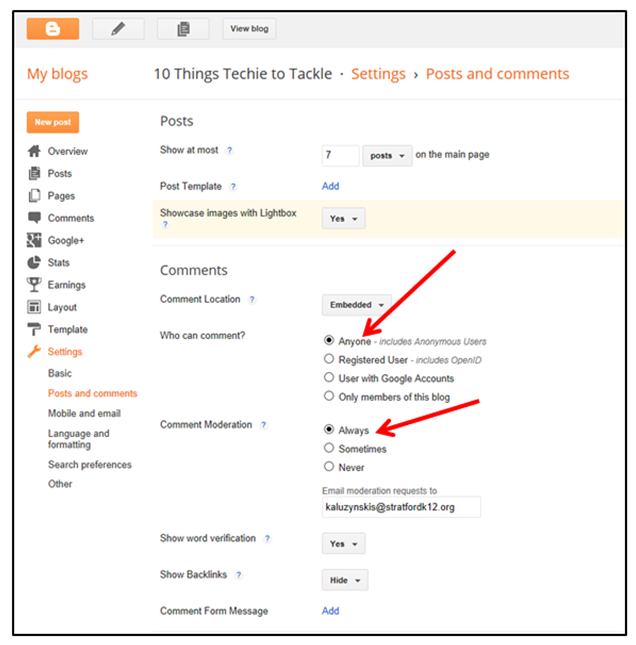
I added a screenshots of how to personalize settings:


Decide if you want your page public (recommended).
Decide if you want it searchable through Blogger or any search engine.
Decide if your viewers must have Blogger accounts, etc. Being more" transparent" is preferred.
 
Comments must be moderated per administration.
 
I recommend that you look over the Social Media policy.

Done.  Now what?

Start Writing. 
Differentiate yourself according to how comfortable you are:
Rookie:  Tell us about yourself!  Well, not TMI (too much information).  But how about what you teach, and what your goals are with this challenge?  What tech integration has worked?  What have you heard about?  Who are your idols? What are some favorite websites?  Groovy websites you've come across?  Read a cool article? Do something neat in a class? Hear about a lesson someone else did?  Get philosophical or just have fun.  Blog it!
Look at other colleagues' 10 Thing blogs.  Post their URLs on your blog and respond/reflect on any that you connect with.
Varsity: Quantity!  Blog several times a week.  Also, check out #CE13 or Google Connected Educator and share what you find! 
Google other educator blogs, especially those in your field.  Get inspired!
All State: Create a test blog using another blogging site and report out your findings/comparisons.  Help another teammate set up!

Assignment

1. Blog on at least 3 different occasions. 
2. Paste your blog URL to the Google Doc spreadsheet so we can all see it!  https://docs.google.com/spreadsheet/ccc?key=0AvD0QN4BeVgzdFdtYWxWOFhpRTk5THM4cWozR0h5MkE&usp=drive_web#gid=0
3. This was meant to be for September.  Long story.  My bad.  Have it done by October 31 please.

Can't wait for Thing 2!

While you wait, check out #CE13 or Google Connected Educator and share what you find! 
If you are comfortable--tweet to our Twitter hashtag (#10thingstechie).  BTW, Twitter (and other tools) other means of expanding your virtual PLN is the next Thing...
Click here to get started!

Friday, September 27, 2013

Welcome to the 10 Things Techie to Tackle Challenge!

10 Things Techie to Tackle

Thank you to Flagship Networks for our Mini Grant!

Join the team.  No tryouts required.  No refs or umpires. 

Only enthusiastic players and spectators.

What is it?

10 Things Techie to Tackle is an informal, participant-driven, somewhat self-directed Professional Development opportunity for teachers to master technology tools with the aim of increasing student learning. Each month, you will Tackle one tool, or Thing.


What's with the name?

While I would love to claim this as my own brainchild, I must share that this program was inspired by a conference I attended last spring.  Sarah Kelly-Mudie, a CT school librarian demonstrated her program (http://14thingstotame.blogspot.com).  Her program piggybacked the original Learning 2.0 Program, which has been successfully adapted by over 750 libraries worldwide!  Feel free to see more at: http://plcmclearning.blogspot.com/


Why would I participate?

If you are reading this page, you are probably already someone who sees the potential of using technology tools as catalysts for learning that can be more authentic, differentiated, engaging, stimulating, effective, and just plain fun
Like most educators, you are likely beat down with deadlines, frustrated by new requirements, and overwhelmed by never-ending to-do lists.  Occasionally you hear about cool stuff but don't know where to start, and you definitely don't have time.  They sink down to the bottom of your inbox--you push them to the back burner.
By Tackling 10 Things Techie, you are only committing to 1 tool per month.  Depending on your experience, background, and comfort level, there will be different options: All-star, Varsity, Rookie.  You get to model lifelong learning AND differentiated learning!
You will get cool prizes, big and small.  That will include token treats that might make your day, and grand prizes (thinking iPads and that sort of thing) will be raffled to players who make every practice and every game. 
 

What are you going to do?  Who are you, anyway?

I will facilitate the program, which will provide virtual instruction (on this blog), mentoring (from myself or another teammate), structure (one Thing per month), and incentives ($1000 grant funding worth of goodies).
 
If you don't know me, I am the Library Media Specialist (LMS) at Stratford High, beginning my third year.  I was formerly the LMS at Franklin Elementary; before that I taught Social Studies for 12 years at Flood Middle School.  I do not have a fancy schmancy degree in Educational Technology.  I dabbled in tech tools during my cross-endorsement as a LMS.  Other than that I've pretty much learned everything I know by playing around and learning from my virtual PLN of educators (across the country) and especially students!  Some of you are definitely techier than me.  I don't claim to be an expert, and I can't answer all your questions, but I will certainly try to help find the answers.
Basically, I am very enthusiastic, love my job, and am a mild insomniac.  I hope that catches on.  Well, not the sleep-deprivation part.. Hmmm... Maybe I'd be a better cheerleader than coach.  Did I really just write that?
John Labate has been recruited to assist, as he was a cool player in the Technology iNtegration Thinktank (TNT) at SHS last year.  Sadly for me he was traded to Bunnell.
 

What will I need to do?

Each month, you will tackle a new assigned "Thing".  Some Things I have planned already.  Some are tentative.   I'm intentionally leaving the last few months flexible.  If you hear about new tools/concepts/sites/skills you think would be valuable to the team, please contribute your suggestions!
For most Things, you will create an account, play around, become familiar.  If you are stuck, poke through the Help links, ask teammates through your/this blog, or check with me.
If applicable, you will try to integrate the tool into your lesson delivery, your planning, your assignments, or your professional habits.
You will share your experience, reflections and opinions on your blog.  Blog?!  Yes, that is your first Thing...

http://10thingstechietotackle.blogspot.com/2013_10_02_archive.html
 

How do I sign up?

Click this link!
Fill out this survey to help me document the project--and to tailor it to your needs.
The directions for the first Thing are here.
 
 
Go Team!
Your edcoach,
Sara Kaluzynski, kaluzynskis@stratfordk12.org 
 
PS Do you love the idea of teacher-driven PD? Me, too! Check out EdCamp: http://edcampboston.org/  Get on the list to be contacted.  Registration filled in 40 hours last year!